


Easy Pose - 3D pose making app
3.65.94K Reviews
App Specs
- Version
- 1.7.8
- Updated On
- License
- Free
- Downloads
- 10,000,000+
- Developer
- MadcatGames
- Categories
- Art & Design
- Platform
- Android, iOS
Screenshots
 Analysis by AppCompare
I find pose apps most useful when they solve a specific drawing problem, not when they try to do the drawing for me. With Easy Pose, the appeal is being able to arrange a figure in three dimensions and study it from a chosen viewpoint. That can be a welcome shortcut when a pose feels stiff on paper, though learning the controls and deciding how much to trust a digital model both take a little patience.
Where pose setup can feel awkward
The first hurdle is translating an idea into joint movements. “A person leaning over a table” sounds simple, but getting the balance, shoulder angle, and hand placement to read clearly can take several small adjustments. I would approach a new scene in stages: establish the torso and legs first, then set the arms, and only after that refine the hands and head. Trying to perfect every joint from the start makes the process feel slower than it needs to be.
It also helps to distinguish between a pose that looks dramatic from one angle and one that is readable from the angle you plan to draw. A bent arm can disappear behind the torso in a front view, for instance. I rotate the model before committing to a sketch, because a quick change in viewpoint can reveal whether a limb is actually placed where I thought it was. That check is more useful than endlessly tweaking a pose while looking from only one direction.
Small checks before building a scene
Before working on a detailed composition, I recommend making a simple test pose. This gives you a chance to learn how selection, rotation, and zoom behave on your device without also managing multiple figures or a complicated arrangement. If a gesture starts looking wrong, undo the last adjustment in your own process by returning to a simpler position and rebuilding from the torso outward; it is usually easier than correcting several connected changes at once.
For a group scene, place the figures with enough separation to inspect each one. Overlapping bodies can make it hard to tell which model or joint you are adjusting, and a clean arrangement at the beginning is easier to refine later. I also check the scene from the intended drawing angle before spending time on details. A setup that looks convincing while rotating may become confusing in the final view.
Recovering a stalled workflow
When a pose stops cooperating, I find it useful to pause and decide what the drawing needs the model to explain. If I only need to understand the angle of a forearm, there is no benefit in polishing the entire figure. I can focus on that limb, compare its direction with the torso, and use the rest of the model as context. This keeps pose-making in service of the artwork rather than turning it into a separate project.
Lighting can help with form, but I treat it as a study aid rather than a guarantee that my finished art will look right. A strong shadow may clarify the shape of a torso, while also hiding a hand or making two limbs blend together. If that happens, I change the view or simplify the pose instead of assuming that more lighting adjustment will solve every readability problem. A clear silhouette is often the better starting point.
Worth Reading Before You Choose

EA SPORTS FC Mobile 26 Is a Bigger Football Game, but It Takes Time

Flipboard Shows What News Apps Must Do Beyond the Feed

Switching to Android Auto Means Rethinking Your Driving Routine

Google Calendar Makes a Crowded Week Easier to Manage

Ludo King Makes the Most of the Minutes Between Plans

Baby Panda World Brings Quick Play to Modern Phones, but Its Game Library Feels Busy
When the problem is outside the app
A reference model can answer questions about volume and joint direction, but it cannot decide what feels expressive in a finished illustration. If a character looks wooden, the issue may be the gesture, the story beat, or the line of action rather than the tool. I sometimes sketch a few loose alternatives beside the pose before choosing one. The 3D reference is best used as a guide, not as a command to copy every angle exactly.
It is also worth separating anatomy study from anatomy authority. A digital figure is useful for observing how parts relate in space, but artists still need to simplify, exaggerate, and correct forms to suit their style. Beginners can use the adjustable joints to explore how a pose changes; more experienced artists may mainly want a quick spatial reference. In either case, comparing the model with gesture drawing and real-world observation keeps the work from becoming stiff.
Who will get the most from it
Easy Pose is an art and design app from MadcatGames, and I see its strongest fit as someone who draws characters regularly and wants a pose reference close at hand. A beginner can use it to inspect a seated figure or test how a raised arm changes the silhouette. A comic artist can block out two characters facing one another before drawing their interaction. For an everyday example, if I have ten minutes between tasks and want to sketch a person carrying a heavy bag, I can arrange a rough pose, check the shoulder and hip tilt, and get back to the page without waiting for a photo reference session.
It is less compelling if what you want is a finished illustration, a guided drawing course, or a full anatomy curriculum. The app helps you construct and inspect a pose; it does not replace practice with gesture, proportion, or observation. Likewise, if your main need is a single photographic reference of a specific person, an image reference may be faster and more convincing than shaping a generic model to match it.
How it fits beside other reference methods
Compared with searching for a pose image, a manipulable figure gives me more control over viewpoint and limb placement. That matters when a stock image is close but not quite right, or when I need to see the same arrangement from another angle. A photograph, on the other hand, usually offers more natural details in clothing, facial expression, and body language. I would use the app to solve spatial questions and photos or live observation to bring individuality and believable surface detail into the drawing.
Compared with a blank sketch, a posed model can make it easier to check depth and overlapping forms, but it can also tempt me to copy stiff proportions. My practical compromise is to use the model for a few decisions—such as where the weight sits or how the arm crosses the chest—then draw over the reference in my own visual language. That way, the tool saves time without making every character look like the same mannequin.
Getting to Know Easy Pose
Picture this: a 3D pose making app that feels like having your personal model right on your phone. That’s what Easy Pose promises and, honestly, it delivers in spades. Whether you’re a professional artist or just someone who loves to doodle in your free time, this app offers a super handy tool to help you visualize and create dynamic poses.
User Interface: A Breeze to Navigate
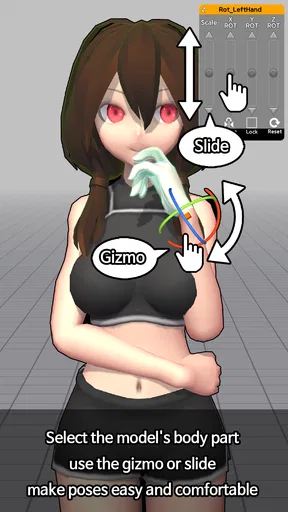
First things first, let’s talk about the user interface. It’s sleek, intuitive, and—most importantly—user-friendly. The moment you open the app, you’re greeted with a clean layout that makes navigation a breeze. You can easily switch between different models and poses with just a couple of taps. Plus, the app supports multi-touch gestures, so zooming in and out or rotating your model feels as natural as flipping through the pages of your sketchbook.
Features That Stand Out
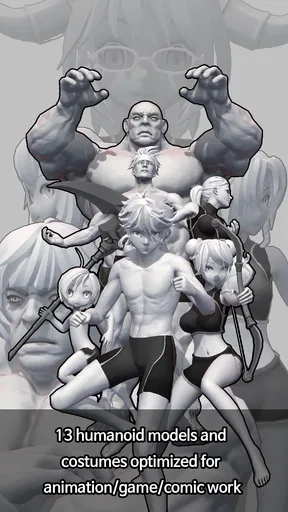
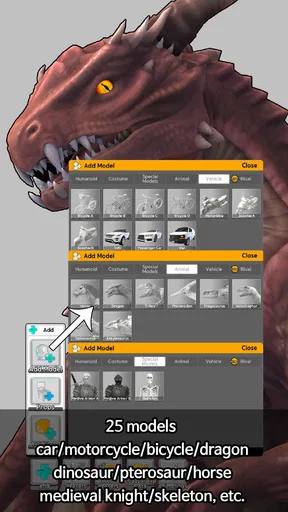
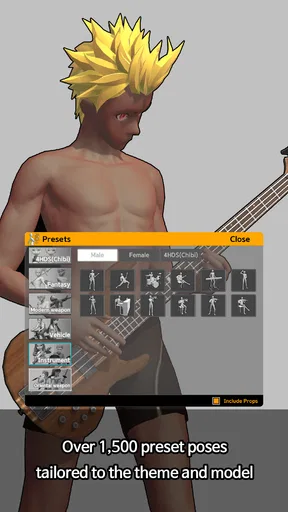
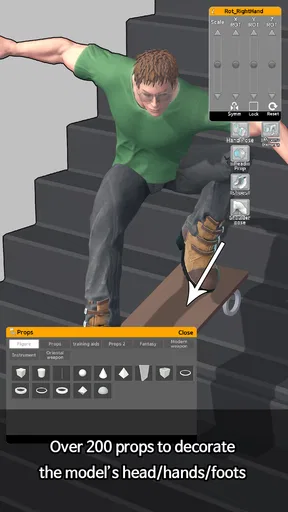
One of the standout features is the ability to manipulate the models in any way you want. Easy Pose offers various models, from male and female figures to more specialized ones like animals and even fantasy creatures. You can adjust the body parts with precision, thanks to the highly detailed joints, and create poses that are as realistic or as fantastical as your imagination allows.
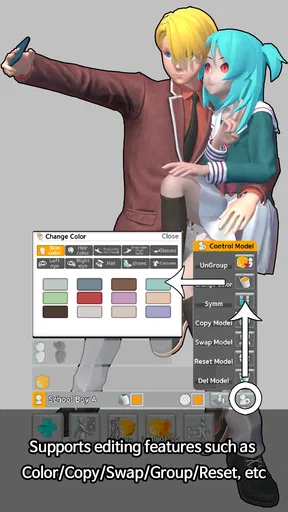
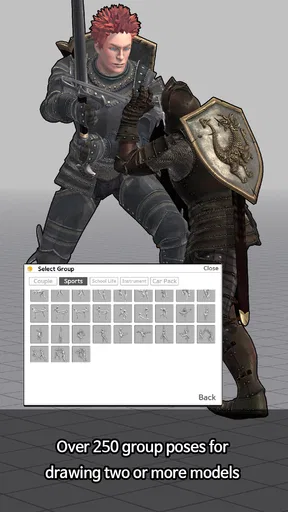
Another feature I love is the ability to add multiple figures into one scene. This is perfect for those complex compositions where interactions between characters are key. You can adjust their positions relative to one another, and even tweak the lighting to capture the mood you’re going for. It’s like being a director and choreographer at the same time!
- Customizable body shapes
- Multiple angle views
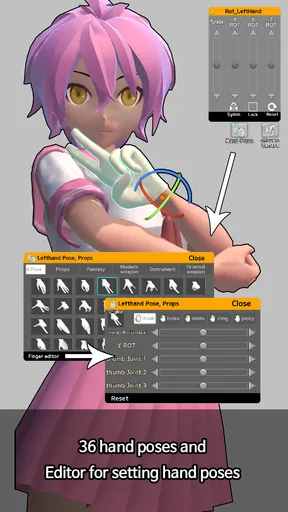
- Varied hand gestures and facial expressions
Perfect for Learning Anatomy
If you’re someone who’s keen on improving your understanding of anatomy, this app doubles as an educational tool. The detailed models help you observe how muscles and joints interact, which is invaluable for both beginners and seasoned artists.
"Easy Pose is like having a 3D anatomy book in your pocket."
It’s not just about static poses either. You can create dynamic scenes that show movement, helping you understand how the body works during different activities. This is a fantastic way to study and practice without needing a live model.
Lighting and Rendering: Bring Your Art to Life
One thing that really sets Easy Pose apart is the lighting options. You can adjust the lighting to see how it affects the shadows and highlights on your models. This feature is crucial for artists who want to understand light and shadow better, as it allows you to experiment and see real-time results. The rendering engine is impressive too, providing smooth animations and a realistic look to the poses.
Minor Drawbacks
Now, no app is perfect, and there are a few quirks. Some users might find the free version a bit limiting, especially if you’re planning to use it intensively. There are in-app purchases for additional models and features, which might be a bummer if you’re on a tight budget. But, if you’re serious about improving your art, the investment is definitely worth it.
Final Thoughts
All in all, Easy Pose is a fantastic tool for any artist. It’s packed with features that make creating and studying poses not just easy, but also incredibly fun. Whether you’re sketching, painting, or diving into digital art, this app is a must-have. So, if you haven’t already, give it a shot—I bet you’ll find it as invaluable as I do!
Ready to embark on your next artistic journey? You can download Easy Pose from the App Store or Google Play and start exploring its endless possibilities today!
Choosing an approach that matches your drawing
The useful question is not whether a pose can be made more elaborate, but whether that extra work improves the drawing. For a quick gesture study, I would keep the model simple and spend the saved time drawing several variations. For a cover illustration or a crowded scene, arranging figures and checking their relative positions can justify a longer setup. The app is most valuable when it answers a visual question I could not settle quickly on paper.
There is also a practical trade-off between anatomical accuracy and readability. A pose can be physically plausible yet look dull, while a deliberately exaggerated stance may communicate motion more clearly. I use the model to check how the body occupies space, then adjust the sketch for emphasis. If the result feels too symmetrical or posed, shifting the shoulders and hips in the drawing can restore a more spontaneous quality.
Making a reference useful on a small screen
On a phone, detailed posing is naturally more fiddly than working at a larger screen. I would zoom in only when a hand, foot, or joint needs attention, then zoom back out to judge the whole silhouette. Staying close to one body part for too long can make local accuracy win over the overall gesture. A useful habit is to alternate between a close inspection and a full-figure view before deciding the pose is ready.
The same principle applies to several characters: solve the relationship first, then polish individual figures. Decide where each person is looking, how much space separates them, and which forms should overlap. Once that reads clearly from the drawing angle, refine the smaller details. This keeps a multi-figure setup from becoming a collection of individually convincing models that do not interact as a scene.
Cost, compatibility, and expectations
The app is free to start, with in-app purchases listed at around three to thirteen dollars per item. I would begin with the available free experience and identify a specific limitation before buying anything, rather than paying in the hope that a purchase will improve drawing skills by itself. It has a Teen content rating, runs on Android versions starting with 5.1, and its current version is 1.6.10. Those details make it easier to judge whether it fits your device and household, while the purchase range is worth considering if you are budgeting for an art tool.
Its average is about 3.6 from roughly 97,000 ratings, with around 5,900 written reviews and over 10 million installs. I treat those figures as context rather than a promise that the controls will suit every artist: a pose-making workflow is personal, and patience with joint manipulation matters more than popularity. MadcatGames released it on January 18, 2018, and continued version development is reflected in the current release, but I would still judge it by whether it helps with the references I actually need.
My practical verdict
I would recommend Easy Pose to character artists who often need to inspect a body from an unusual angle, block a two-person interaction, or test a gesture before drawing. Its combination of adjustable figures, viewpoints, and lighting gives me a flexible reference workspace, especially when a single photo does not match the composition in my head. It is not a substitute for observation, expressive drawing, or a carefully chosen photographic reference, and the setup can feel like extra work when the pose is simple.
My best advice is to use it with a clear question: where does the weight sit, how does the arm cross the body, or will this interaction read from the chosen viewpoint? If it answers that question, move back to the artwork and make the pose your own. If you want instant natural detail or a tool that teaches drawing step by step, another reference method will serve you better. For artists who enjoy shaping a scene and learning by rotating a model, the free starting point makes it an easy option to try.
Pros
- Intuitive interface for easy navigation.
- Wide range of customizable poses.
- Supports multiple figures in one scene.
- Detailed anatomical models available.
- Frequent updates with new features.
Cons
- Limited free features; in-app purchases required.
- Occasional app crashes on older devices.
- High learning curve for beginners.
- No offline mode; requires internet.
- Limited export options for created poses.
FAQs for Easy Pose - 3D pose making app
What is Easy Pose, and how can it benefit me?
Easy Pose is a 3D pose creation app designed for artists and animators. It allows users to create and manipulate 3D models in various poses, providing a versatile tool for visualizing human anatomy and movement. Whether you're a professional or a hobbyist, Easy Pose offers an intuitive interface to enhance your creative projects.
Does Easy Pose support multiple characters in a single scene?
Yes, Easy Pose allows users to add multiple characters to a single scene. This feature is particularly useful for creating dynamic interactions between figures, such as group poses or complex animations. Users can adjust each character's pose individually, enhancing the app’s versatility for storytelling and composition.
Are there different body types and models available in Easy Pose?
Easy Pose offers a variety of body types and models, including male, female, and child figures. This diversity allows users to accurately represent different characters and physiques in their artwork. Additionally, the app offers customizable features so you can fine-tune body shapes to better suit your artistic needs.
Can I export my poses for use in other applications?
Yes, Easy Pose provides options to export your created poses in formats compatible with other applications. This feature is particularly beneficial for artists who wish to integrate their 3D models into digital art software for further refinement or as references for traditional drawing.
Is Easy Pose suitable for beginners, or is it more advanced?
Easy Pose is designed to be user-friendly, making it accessible for beginners while still offering advanced features for experienced users. Its intuitive interface and comprehensive tutorials help new users get started quickly, while advanced tools and customization options cater to professional needs.


